↑
Back to Top
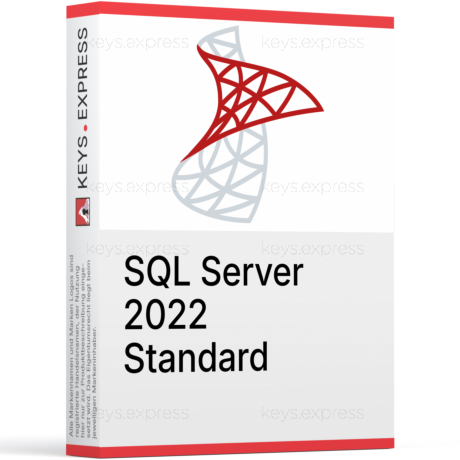
What are the main features and advantages of Microsoft Server 2022 Standard?
Core Server – Runs essential roles for business infrastructure.
Virtual Rights – Includes two virtual instances per licensed server.
Secure Baseline – Improves protections for identities, traffic, and data.
Hybrid Management – Integrates with cloud tools for simplified administration.
Container Support – Runs Windows containers for modern app deployment.
Flexible Roles – Supports file, print, DNS, and directory services.
Download: Server 2022 Standard
Full server roles – Active Directory, DNS, DHCP, file and print services.
Hyper-V virtualization – Run two licensed Windows Server virtual machines.
Windows containers – Unlimited Windows containers for app isolation and packaging.
Secured-core support – Hardware-root security, HTTPS/TLS 1.3, and encrypted DNS.
Storage Replica – Single partnership, one volume capped at 2 TB.
Core Capacity – Minimum 16 core licenses per server, 8 per processor.
Important – Unlimited Virtual Machines, Storage Spaces Direct, and Client Access Licenses (CALs) are not included in this edition.
Microsoft Server 2022 Standard is the core-licensed server operating system for physical or lightly virtualized deployments. It runs the standard infrastructure roles a business needs while including rights for two virtual machines per fully licensed server.
Lightly virtualized fit – Two VMs cover a DC plus one app server.
Predictable core licensing – Pay per physical core, 16-core base.
Stackable VM rights – Re-license all cores to add two more VMs.
Hybrid management – Connect to Azure Arc and Windows Admin Center.
Container ready – Unlimited Windows containers without extra OS licenses.
Secured-core baseline – Firmware protection and SMB hardening against tampering.
It is the server operating system that hosts your network's core roles: Active Directory domain controller, DNS, DHCP, file and print services, IIS web hosting, and Hyper-V. The Standard license includes the right to run two Windows Server virtual machines (OSEs) when every physical core on the host is licensed. In practice this lets a small business run one virtualized domain controller and one virtualized line-of-business server on a single box. For everything beyond those two VMs, you re-license the full host core count again for each additional pair.
It suits small and mid-sized organizations that run a fixed, low number of virtual machines on dedicated hardware. Standard includes rights for exactly two VMs per licensed server, so it fits a shop that needs, for example, a domain controller and a file or application server without planning to scale into a dense virtualization cluster. If your VM count keeps climbing, the cost of stacking Standard licenses (each pair of VMs requires re-licensing all host cores) eventually crosses over to where Datacenter is cheaper. The practical decision point is roughly when a single host carries more than a dozen Windows VMs.
Standard and Datacenter share almost the same feature set and the same per-core licensing model; the differences are virtualization rights and a few storage and security features. Standard grants two VMs per licensed server, while Datacenter grants unlimited VMs on a licensed host. Datacenter also adds Storage Spaces Direct, Shielded VMs, software-defined networking, and unlimited Storage Replica volumes, none of which exist in Standard. The table below summarizes the verified differences.
| Feature | Standard | Datacenter |
|---|---|---|
| Virtual machine rights | 2 VMs | Unlimited |
| Windows containers | ✓ | ✓ |
| Storage Spaces Direct | ✕ | ✓ |
| Shielded VMs | ✕ | ✓ |
| Software-defined networking | ✕ | ✓ |
| Storage Replica | Limited | Unlimited |
| Per-core licensing | ✓ | ✓ |
| CALs required | Yes | Yes |
One Standard license, covering all physical cores of the host, grants the right to run two Windows Server virtual machines. You cannot license a single VM on its own; the rights come in pairs. To run a third and fourth VM, you re-license the full host core count again, and so on for each additional pair. This is why a host packed with many Windows VMs becomes expensive on Standard, and why Datacenter (unlimited VMs per host) is usually the better value past roughly a dozen VMs on one server.
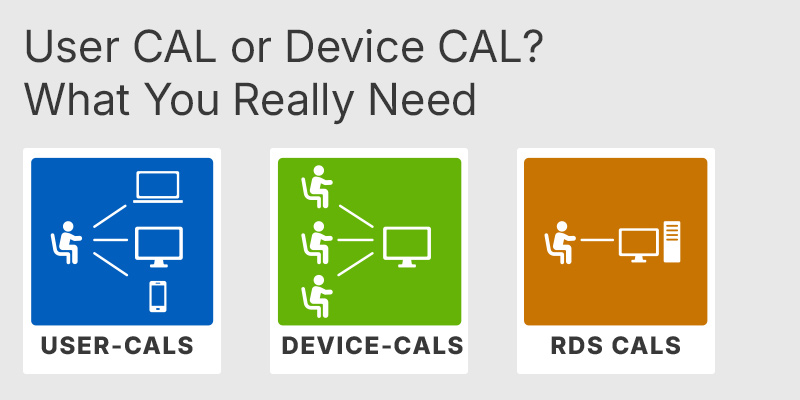
Yes. The server license does not include any CALs, and every user or device that accesses the server needs a Windows Server CAL. You choose between User CALs (one per named person, who can connect from any device) and Device CALs (one per device, shared by any number of users). Remote Desktop Services is an additive layer: hosting RDS session-host connections requires separate RDS CALs on top of the base Windows Server CAL. Budget for the correct CAL type and quantity before deployment, because the server will run without them but you would not be correctly licensed.
No. Storage Spaces Direct, Shielded VMs, and software-defined networking are exclusive to the Datacenter edition and are absent from Standard. Standard does include Storage Replica, but only a single partnership with one resource group and a volume capped at 2 TB, whereas Datacenter removes that limit. If your plan depends on hyper-converged software-defined storage or VM-level shielding, Standard cannot deliver it and you need Datacenter. For a basic file server with one replicated volume under 2 TB, Standard's Storage Replica is enough.
Standard is licensed by physical core, with a hard minimum of 8 core licenses per physical processor and 16 core licenses per server, even when the hardware has fewer cores. All physical cores in the server must be licensed before the two-VM virtualization right applies. Core licenses are sold in packs of two and packs of sixteen, so a 24-core or 40-core host is covered by combining packs. This minimum matters when buying for a small single-socket box: you still pay for 16 cores even on an 8-core CPU.
Yes, Standard includes the Remote Desktop Services role and can act as a session host, but every connecting user or device needs an RDS CAL in addition to the base Windows Server CAL. The RDS CAL is an additive access license; the base Server CAL alone does not grant RDS session rights. This is the most common licensing gap buyers overlook when setting up a terminal-server style environment. Plan the RDS CAL type (User or Device) the same way you plan base CALs.
Confirm three things: your total physical core count (to size the 16-core minimum and any packs above it), your real VM count (Standard caps at two per fully licensed host), and your CAL requirement (none are included). If you expect to grow past a couple of VMs or need Storage Spaces Direct, Shielded VMs, or SDN, price Datacenter before committing, because retrofitting those capabilities means a different license entirely. Also verify whether any workload needs RDS, since that adds a separate RDS CAL line to the order.
| Processor | 1.4 GHz 64-bit processor or faster. Compatible with x64 instruction set. Supports NX and DEP. Supports CMPXCHG16b, LAHF/SAHF, PrefetchW instructions. Supports Second Level Address Translation EPT or NPT. Supports SSE4.2 Streaming SIMD Extensions 4.2 instruction set. Supports POPCNT instruction. |
| Memory RAM | 512 MB for Server Core. 2 GB for Server with Desktop Experience. ECC Error Correcting Code type or similar technology recommended for physical host deployments. |
| Hard Disk | 32 GB of space minimum on the system partition. Additional space may be required for updates, paging, dump files, and installed roles and features. |
| Display | Monitor capable of Super VGA 1024 x 768 or higher resolution, only required for certain features. |
| Graphics | Integrated or dedicated graphics adapter supporting Super VGA 1024 x 768 or higher resolution, only required for certain features. |
| Note | Windows Server 2022 Standard and Datacenter editions share the same minimum hardware requirements. Actual requirements vary based on system configuration, installed applications, and enabled roles and features. |
keys.express and keys.discount is a web platforms for new and used product keys. The product keys for Windows and other software available in the shop of keys.express and keys.discount are cheap, safe, legal and with activation guarantee.
Here you can find some general information about used software, an overview of the most important legal information as well as answers to frequently asked questions from our customers ("FAQ“)
Used software is available for sale in the European Union as well as in Switzerland according to current jurisdiction provided that the necessary conditions are met. The necessary conditions are as follows:
keys.express and keys.discount ensure that the above mentioned requirements are met and that a legal use of the software is guaranteed. The requirements of the European legislation are also met in Switzerland.
You can find further information on:
There is a lot of legal information about the topic of used software. We are more than happy to answer any questions you may have. You can contact us at any time via welcome(at)keys.express. In the meantime, you can also find a short overview of the most important legal information regarding used software here:
For distance contracts concluded by telephone, on the Internet or when ordering from a catalogue, EU law provides for the possibility for consumers to withdraw from the contract for a certain period of time ("right of withdrawal"). A consumer in this sense is any natural person who concludes a legal transaction for purposes that are predominantly neither commercial nor self-employed. In Switzerland we usually speak of consumers.
Consumers have the right to cancel the contract within fourteen calendar days without giving reasons. The revocation period begins on the day the contract is concluded.
In order to exercise your right of withdrawal from keys.express or keys.discount, you must inform us by means of a clear statement (e.g. a letter, fax or e-mail sent by post) of your decision to withdraw from this contract. For this purpose, you can contact us using the following information:
Keys Distribution Ltd
Suite 2, 215 Main Street
Gibraltar Heights, Gibraltar
Phone +423 7989130
Email: welcome@keys.discount
keys.express and keys.discount also provides a template revocation form. In order to comply with the revocation period, it is sufficient to send the notification of the exercise of the right of revocation to Keys Distribution Ltd before the end of the revocation period.
If you revoke this contract, we must reimburse you for all payments which we have received from you for the corresponding order, including delivery costs (with the exception of additional costs which result from the fact that you have chosen a different type of delivery than the cheapest standard delivery offered by us), immediately and at the latest within fourteen calendar days from the day on which we receive notification of your revocation of this contract. For this repayment we will usually use the same means of payment that you used for the original transaction, unless expressly agreed otherwise with you. In no case will you be charged for this refund.