


Back to Top
User CAL or Device CAL: What You Really Need
July 22, 2026
Views:
95
You’ve purchased a Windows Server—but the licensing process isn’t complete yet. While the operating system can be installed, access to it isn’t covered. That’s where Client Access Licenses—or CALs for short—come in. If you plan this incorrectly, you’ll either pay too much or find yourself in trouble during a license audit. The question that determines nearly every procurement decision: User CAL or Device CAL? The answer depends less on the budget than on the ratio of employees to devices—and on whether remote desktop sessions are involved.
What exactly is a CAL for Windows Server?
A CAL is an access right, not software. It authorizes a user or a device to use the services of a Windows Server: logging into Active Directory, file shares, print services, DHCP, and DNS. The server license itself covers only the installation and operation of the operating system. Only when combined do they constitute a complete licensing solution.
Many buyers don’t realize the difference from traditional software until later: A base CAL isn’t installed or activated anywhere. It’s a document granting a right. Only RDS CALs are actually stored on a license server and issued.
Why isn’t the Windows Server license alone sufficient?
Because Microsoft licenses server operation and server access separately. The server license is calculated based on processor cores—at least 16 cores per server, at least 8 per processor. These core licenses do not specify how many people or devices will subsequently use the server. This is precisely what the CALs cover.
In practice, this means: A Server 2025 Standard with 16 cores is fully licensed, but as soon as the first employee logs into the domain or opens a shared folder, a CAL is required. Technically, nothing blocks access—the server does not check for the basic CALs. The obligation still exists, however, and in the event of an audit, the burden of proof lies with the customer. Anyone who purchases only the server license and ignores the rest is operating an incompletely licensed environment that will require costly retroactive licensing in the event of an audit.
What is the difference between a User CAL and a Device CAL?
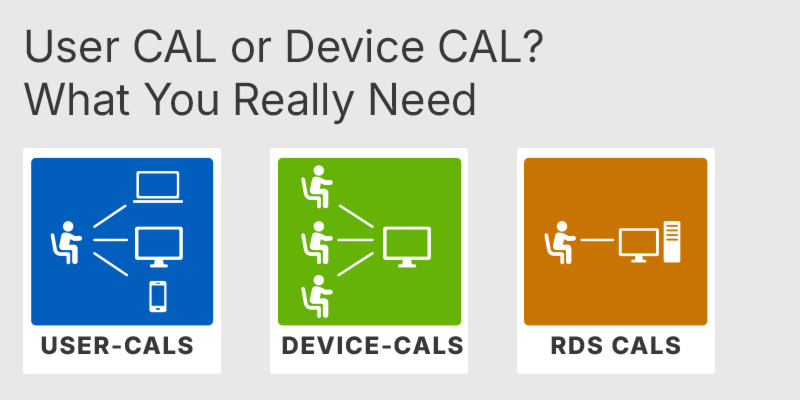
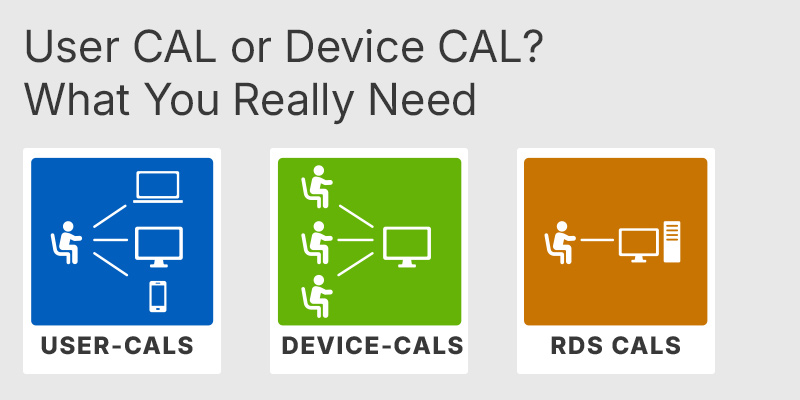
A User CAL licenses a person who may access the system from any number of devices. A Device CAL licenses a device that may be used by any number of people. Both cover the same scope of functionality—the difference lies solely in how they are counted.
- User CAL: An employee with a laptop, smartphone, and home office PC needs a single CAL.
- Device CAL: A point-of-sale terminal used by twelve different people throughout the day requires a single CAL.
The math is simple: more devices than users calls for User CALs; more users than devices calls for Device CALs.
When is the User CAL the more cost-effective choice?
In any office where one person uses multiple devices. This has become the norm: a laptop plus a smartphone plus, occasionally, a personal device connected via VPN. Three devices, one person, one CAL. With device licensing, it would be three.
It also makes sense for mobile field staff, hybrid work models, and BYOD strategies. Another advantage in day-to-day operations: The count remains stable because it’s linked to the employee roster. New hardware doesn’t change the licensing requirements.
Microsoft Server 2025 User CAL
When is the Device CAL a good choice?
Anywhere where hardware is shared. Shift-based production, call centers with rotating workstations, point-of-sale systems, workshop terminals, training rooms, and kiosk systems in logistics. Three shifts on a single terminal mean three users—but only one Device CAL.
The Device CAL has a second, often underestimated advantage: it’s easier to track. Devices can be inventoried, and staff turnover doesn’t affect the count. In businesses with high employee turnover or many temporary workers, this is a real administrative advantage.
Microsoft Server 2025 Device CAL
Can you mix User CALs and Device CALs?
Yes. Microsoft allows both types in the same environment, and in established companies, this mix is often the most cost-effective solution: Device CALs for shared terminals on the production floor, User CALs for administration and sales.
The trade-off is the documentation effort. It must be clear which accesses are covered by which type of CAL—and every access requires exactly one valid assignment. Without a clear inventory, this mixed model becomes a vulnerability during an audit. Small environments usually fare better with a uniform model.
How many CALs are needed—per server or per network?
Per network. CALs are not counted per server. An employee who accesses a file server, domain controller, and print server needs one User CAL, not three. This is one of the areas where companies regularly over-purchase.
Instead, the version is the deciding factor: the latest Windows Server on the network is what matters. If there’s a Server 2025 somewhere, all CALs must be at the 2025 level—even for users who work exclusively with the older 2019 version.
Which CAL is right for which use case?
The following overview compares the four license types. Basic CALs and RDS CALs are not alternatives to one another but build on each other—the comparison primarily shows which rights are included in each and which are not.
| Feature | User CAL | Device CAL | RDS User CAL | RDS Device CAL |
|---|---|---|---|---|
| Licensed | Person | Device | Person | Device |
| Basic Access (File, Print, AD) | ✓ | ✓ | ✕ | ✕ |
| Remote Desktop Sessions | ✕ | ✕ | ✓ | ✓ |
| Additional Basic CAL required | ✕ | ✕ | ✓ | ✓ |
| Installed on the license server | ✕ | ✕ | ✓ | ✓ |
| Multiple devices per person | ✓ | ✕ | ✓ | ✕ |
| Multiple users per device | ✕ | ✓ | ✕ | ✓ |
| Shift work, shared PCs | Limited | ✓ | Limited | ✓ |
| Mobile users, BYOD | ✓ | Limited | ✓ | Limited |
| Downgrade to older servers | ✓ | ✓ | ✓ | ✓ |
| Edition-independent | ✓ | ✓ | ✓ | ✓ |
| Perpetual license, no subscription | ✓ | ✓ | ✓ | ✓ |
| Audit verification | Depends | Depends | See note | See note |
Regarding the restrictions: “Limited” means that the license type works in the given scenario but is economically disadvantageous—User CALs for a shift terminal are permitted but cost an additional license per shift. “Depends” refers to the effort required for verification: For Basic CALs, this depends on how accurately personnel and device inventories are maintained, since no technical count exists. “See note” for RDS-CALs means that the assignment is logged in the RD Licensing Manager and is therefore technically traceable—the business-side assignment must still be documented.
What is an RDS-CAL, and why isn’t a standard CAL sufficient for this purpose?
As soon as users work on a server via Remote Desktop—whether using entire desktops or individual published applications—a second licensing tier applies. The Basic CAL covers access to file services and directories, but not the initiation of a session on the server itself.
For terminal server environments, therefore, the requirement is: Basic CAL plus RDS CAL, per user or per device. Anyone who overlooks this item in their calculations regularly underestimates the licensing costs of an RDS farm by about half. The RDS User CAL is suitable for consultants, field staff, and home office users who access the same session from different devices.
Microsoft Server 2025 RDS User CAL
How are RDS CALs managed technically?
Unlike Basic CALs, RDS CALs are true, installable licenses. They are activated on a role called Remote Desktop Licensing, where the license server issues them to connections. The licensing mode is set per deployment—either “Per User” or “Per Device.” A later change is possible but inconvenient because existing CALs cannot be easily converted.
Two issues regularly lead to questions during operation:
- Without a configured license server, a deployment operates in a temporary grace period and subsequently denies new sessions.
- Per-user CALs appear in the Manager with a 60-day duration, which renews with each login. This is a tracking mechanism, not an expiration date for the purchased license.
In device mode, the CALs are tied to the hardware and tracked in the directory—the ideal choice for thin clients and fixed workstations in shift operations.
Microsoft Server 2025 RDS Device CAL
Buy Server 2025 RDS Device CAL
Does the CAL version have to match the server version?
The rule works one way: A newer CAL covers older servers, but an older CAL does not grant access to a newer server. A CAL for Server 2025 therefore also allows access to 2022, 2019, and 2016. A 2022 CAL is not sufficient for a 2025 server.
For mixed environments, this simplifies planning: Instead of splitting licenses by server version, you can base your entire inventory on the newest system. For RDS CALs, the same logic applies with respect to the session host.
Are CALs product keys that you install?
Not for Basic CALs. There is no installation, no activation, and no dialog in Server Manager where the number of access licenses would be entered. The server simply does not check for them. All that remains is the proof of purchase and your own documentation—precisely the two things that will be requested during an audit.
RDS-CALs are the opposite: they are activated, stored on the license server, and technically issued. Anyone purchasing either type for the first time should be aware of this difference; otherwise, they may get the impression that a purchased Basic CAL “didn’t go through.”
What applies to external users, customers, and partners?
External access—such as customers using a portal on their own server or partners on an extranet—can be handled in two ways: via individual CALs per person or device, or via one External Connector per server, which covers an unlimited number of external users.
The decision is purely a matter of math. For a small number of named external users, individual CALs are more cost-effective; for anonymous or highly fluctuating user groups, the External Connector quickly pays for itself. It’s important to make a clear distinction: Your own employees and contractors working on behalf of the company are not considered external users.
Does indirect access via an intermediary application count as well?
Yes. This point often proves costly during audits. If an ERP system, a web portal, or a middleware service establishes the connection to the server and there are fifty users behind it, this does not reduce the CAL requirement. Multiplexing and connection pooling do not affect the count—the person or device at the end of the chain is subject to licensing.
Anyone operating application servers, time-tracking systems, or mobile apps with a server backend should explicitly list these access paths in their licensing plan.
Does all of this also apply to Windows Server Essentials?
Essentials is a special case. This edition is designed for small environments and comes with a fixed user limit, eliminating the need to purchase separate CALs. For businesses below this limit, this is the simplest setup possible.
The catch becomes apparent as the business grows: If the limit is exceeded, there’s no way around switching to the Standard edition—and from that point on, CALs are required for all access, not just the additional users. If you anticipate growth, it’s best to factor this upgrade into your calculations right away.
What mistakes stand out during a license audit?
The classic mistakes recur in almost every audit report:
- Server purchased, CALs forgotten—the most common individual case.
- CAL version older than the latest server version on the network.
- RDS operation without separate RDS CALs, using only base CALs.
- Service accounts, scanners, multifunction devices, and time-tracking terminals not included in the count.
- Indirect access via applications not accounted for.
- No reliable documentation because Basic CALs are not technically visible.
A simple table listing purchase receipts, CAL type, quantity, version, and assigned users or devices can save a significant amount of effort in the event of an audit. It should be maintained as long as the environment is in operation—not just when a request is already on the table.
How do you plan for CALs when upgrading to Windows Server 2025?
The order and timing determine the costs. As soon as the first 2025 server goes live, all users or devices accessing it must have 2025 version CALs—even those that continue to work exclusively with the old server. A phased rollout therefore does not postpone the licensing requirement; it brings it forward.
Before purchasing, it’s worth checking four key points:
- How many people and how many accessing devices are there, actually?
- Given the current ratio, which model results in the smaller number?
- Is RDS being used, and if so, to what extent?
- Is there external access that would be more cost-effective via an External Connector?
If you have these figures, you can complete the purchase in a single transaction instead of making multiple follow-up purchases.
Can CALs be purchased later?
Yes, CALs can be added at any time, and they are perpetual licenses with no term. Purchasing additional CALs as staff grows is standard practice and does not require any technical changes, as long as the license type remains the same.
Changing the licensing model is more complicated. Switching from device-based to user-based CALs does not involve conversion but rather a new purchase—the old licenses remain valid but only cover their previous allocation. Therefore, the fundamental decision between user-based and device-based licensing should be made before the first major purchase.
Are low-cost CALs from volume licensing agreements legally sound?
The trade in licenses already placed on the market is permitted within the EU and in Switzerland if certain conditions are met: The software must have been placed on the market in the European Economic Area with the rights holder’s consent, in exchange for payment, and for an unlimited period of time, and the original purchaser may not continue to use their own copies. This means the principle of exhaustion applies.
For buyers, this means in practice: Make sure to obtain traceable documentation, insist on unused and unactivated keys, and file the documentation along with your own CAL overview. For basic CALs, the receipt is the only proof of purchase available anyway.
Which recommendation is right for which business?
A brief summary by business type:
- Office, agency, law firm: User CALs. Each person uses multiple devices; the count is based on the payroll.
- Manufacturing, logistics, retail with shift work: Device CALs for shared terminals, User CALs for administration.
- Terminal server environments: Basic CAL plus RDS CAL; set the mode at the beginning and stick with it.
- Self-employed individuals and micro-businesses: Consider Essentials as long as the number of users remains below the threshold.
- Environments with customer or partner access: Calculate the cost of the External Connector versus individual CALs.
The key step remains the same: count first, then buy. In most cases, two numbers—the number of people and the number of devices accessing the system—clearly answer the question of which CAL model is right for you.
Disclaimer
This article is for general information purposes only and does not constitute a sales or licensing recommendation. All information has been compiled to the best of our knowledge, but is provided without guarantee of completeness or accuracy. License conditions are subject to change and may be interpreted differently in individual cases. The content does not replace individual legal or licensing advice.
July 22, 2026
Related Products
Windows Server 2025 Device CAL Key
From
136,10 €
Windows Server 2025 User CAL Key
From
136,10 €
Windows Server 2025 RDS Device CAL Key
From
136,10 €
Windows Server 2025 RDS User CAL Key
From
136,10 €
Popular Posts