

Back to Top
What are the main features and advantages of Windows Server 2019 Device CAL?
Device Licensing – License one device for server services access.
Shared Workstations – One licensed PC supports many rotating users.
Simple Tracking – Count devices instead of tracking every user.
Cost Efficiency – Best for shift teams sharing few devices.
Core Services – Covers file print and directory services access.
Audit Ready – Clear device counts simplify compliance reviews.
 Bestseller in this category
Device access – Licenses one device to reach server services
Shared use – Any number of users on that device
Core services – File, print, DNS, Active Directory sign-in
Backward coverage – Valid for Server 2019 and earlier versions
Mixing allowed – Combine with User CALs in one environment
Core Capacity – One device, unlimited users; no RDS rights included
Important – This is not an RDS CAL; Remote Desktop sessions require separate RDS CALs.
A Windows Server 2019 Device CAL is the access license that legally permits one device to use a Windows Server 2019 machine. It is counted per device rather than per person, so several staff sharing the same workstation are all covered by a single CAL.
Lower cost – Cheaper when devices outnumber your staff
Shift friendly – One CAL covers all device users
Simple counting – Tally hardware, not individual accounts
Audit cover – Keeps Server 2019 access compliant
Flexible mix – Pair with User CALs as needed
No expiry – The CAL right does not lapse
A Device CAL grants one device the legal right to access services on a Windows Server 2019 server, no matter how many people use that device. The CAL is required separately from the server licence itself: the per-core server licence covers installing the operating system, while CALs cover the clients that connect to it. In practice this means a single till, kiosk, or shared shop-floor PC needs just one Device CAL even if ten employees log in on it during the day. The licence applies to standard network services such as file shares, print queues, DNS, and Active Directory authentication. It does not enable Remote Desktop sessions, which are licensed under a separate RDS CAL.
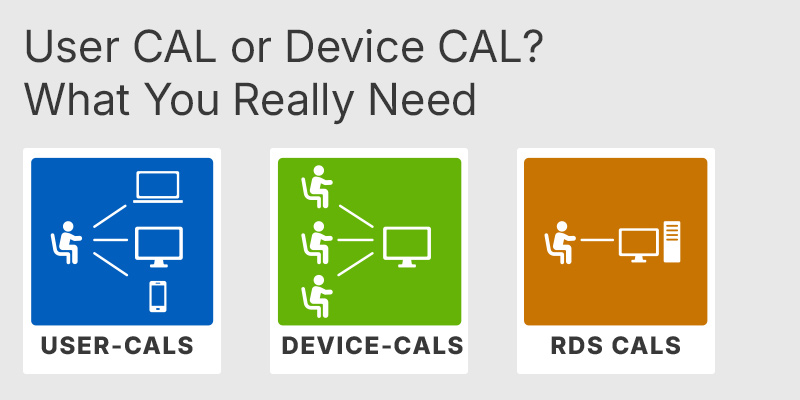
User CAL or Device CAL: What You Really Need
Explains when a User CAL or Device CAL is the more cost-effective choice when upgrading to the Standard edition.
End of Support for Windows Server 2022: Windows Server 2025 vs. 2022 vs. 2019: Is It Worth Upgrading?
Compares the 2019, 2022, and 2025 releases to help determine whether upgrading to the latest version is worthwhile.
A Device CAL is the cheaper choice when an organisation has fewer devices than users, typically because staff share machines. The classic case is shift work: a warehouse, factory, hospital ward, or retail floor where three people use the same terminal across a 24-hour rota only needs one CAL for that terminal instead of three User CALs. This directly lowers the licence count where headcount is high but hardware is fixed. By contrast, if your staff each carry a laptop and a phone that both hit the server, User CALs usually work out cheaper, because one User CAL covers all the devices a single person uses.
A Device CAL licenses one physical device for unlimited users, while a User CAL licenses one named person for unlimited devices. The deciding factor is whether you have more devices or more people. A Device CAL fits shared hardware used by rotating staff; a User CAL fits a worker who connects from a desktop, a laptop, and a phone. You cannot cover the same access with both types at once, but you are allowed to mix Device and User CALs within the same Server 2019 environment to match each part of the workforce.
No. A standard Windows Server 2019 Device CAL covers normal network services only and does not grant Remote Desktop Services access. To let a device run a full Remote Desktop session on the server, you need a separate RDS Device CAL on top of the standard CAL, plus an RD Licensing role to issue it. This is a frequent and costly buying mistake: ordering only standard CALs and then finding remote sessions stop once the built-in grace period ends. If your goal is multiple simultaneous remote desktops, budget for both the Windows Server CAL and the matching RDS CAL.
A Windows Server 2019 CAL is backward-compatible only: it covers access to Server 2019 and earlier server versions, but not Server 2022 or 2025. If you upgrade the server operating system to a newer version, your existing 2019 CALs do not carry forward and you must buy CALs that match or exceed the new server version. Before purchasing, confirm which Windows Server version your server actually runs, so the CAL version lines up. Buying 2019 CALs for a 2022 server is the most common reason a purchase ends up non-compliant.
Check three things: your device-to-user ratio, the exact server version, and whether remote desktop is involved. Count the devices that actually touch the server versus the number of people, and pick Device CALs only if devices are fewer. Confirm the server is running Windows Server 2019, since the CAL must match or be newer than the server it accesses. Finally, decide whether anyone needs Remote Desktop sessions, because that requires additional RDS CALs the standard Device CAL does not cover. A standard CAL ships as a proof-of-licence document rather than installable software, so there is no separate client program to deploy.
Yes. CALs only license the clients that connect; they do not license the server itself. You still need a separate Windows Server 2019 licence for the machine, and the CALs sit on top of that to cover the devices accessing it.
You need one Device CAL for each device that accesses the server, regardless of how many people use that device. Count the physical machines that connect, not the number of employees.
CALs are assigned by type and are not interchangeable once allocated, but you can mix both kinds across one environment. Many organisations assign Device CALs to shared terminals and User CALs to mobile staff at the same time.
| Important | To use Windows Server 2019 Device CAL, your server must meet the Windows Server host requirements and RDS licensing compatibility hardware and software specifications. |
| Compatibility | Windows Server 2019 Windows Server 2016 Windows Server 2012 R2 Windows Server 2012 |
| Operating Systems | Windows Server 2019: Standard / Datacenter |
| Processor | 1.4 GHz 64-bit processor or faster. Compatible with the x64 instruction set. Support for NX and DEP. Support for CMPXCHG16b, LAHF/SAHF, and PrefetchW instructions. |
| Memory RAM | 512 MB for Server Core installations. 2 GB for Server with Desktop Experience. ECC memory or similar technology for physical host deployments. |
| Hard Disk | At least 32 GB of available system partition space. Additional space may be required for paging, hibernation, and dump files. |
| Display | Monitor capable of a resolution of 1024 × 768 or higher. |
| Graphics | Super VGA compatible graphics device. |
| Note | One Device CAL licenses one device to access compatible Windows Server services. A separate RDS CAL is required for access to Remote Desktop Services. Actual requirements depend on the installed server roles, applications, and configuration. |
keys.express and keys.discount are online platforms for product keys. The product keys available in our shops for Windows and other software are inexpensive, secure, legal and come with an activation guarantee.
Below you will find the most important legal information about our products.
We offer exclusively unused and non-activated product keys. The keys have never been redeemed for activation and are fully available to the purchaser for the first-time activation of the respective product. A key that has already been redeemed could no longer be used for a new activation and is therefore not offered by us.
Trading in these product keys is permissible in the European Union and in Switzerland under current case law, provided that the necessary conditions are met. These conditions are as follows:
This trade is legally permissible because the underlying license was already placed on the market with the consent of the rightholder within the EU/EEA or Switzerland in return for appropriate remuneration. As a result, the so-called principle of exhaustion has taken effect, which permits the resale of individual product keys — in particular those originating from volume license agreements. Microsoft or the respective software provider has already received appropriate remuneration for this.
keys.express and keys.discount ensure that the aforementioned conditions are met and that the lawful use of the software is guaranteed. The requirements arising from European legislation are also observed in Switzerland.
Important note: The acquisition of a product key through the transmission of a combination of numbers and letters in digital form does not, in itself, constitute a license for the lawful use of the program. The license only arises from the respective installation and the associated acceptance of the manufacturer's terms of use.
Further information can be found here:






