




↑
Back to Top
What are the core benefits and key advantages of Kaspersky Premium?
Real-Time Defense – Stops malware fast with cloud-assisted heuristics.
Ransomware Shielding – Prevents file encryption and blocks malicious behavior.
Privacy VPN – Encrypts traffic on public Wi-Fi for privacy.
Password Vault – Stores logins securely with encrypted autofill access.
Identity Monitoring – Alerts you to leaks and risky accounts.
Proactive Security – Continuous updates keep protection one step ahead.
Download: Kaspersky Premium

Real-time protection – Blocks malware, ransomware, and phishing as they appear.
Unlimited VPN – Encrypts traffic on public Wi-Fi without data caps.
Password Manager – Stores, generates, and auto-fills logins across devices.
Identity Protection – Monitors data leaks and guards stored documents.
Safe Kids – Full parental controls with screen time and GPS.
Core Capacity – Covers Windows, macOS, Android, iOS, and Linux.
Kaspersky Premium is the top tier in the home line and bundles the full antivirus engine with privacy, identity, and family tools. It adds Identity Protection, Smart Home monitoring, and 24/7 remote IT support on top of everything in Kaspersky Plus.
One subscription – Replaces separate VPN and password manager tools.
Safe Money – Opens banking sites in a protected browser.
Data Leak Checker – Scans the web and dark web for breaches.
Expert removal – Technicians clean pre-existing infections before setup.
Smart Home scan – Flags weak Wi-Fi and unknown device connections.
Low impact – Runs quietly with strong independent lab scores.
Kaspersky Premium is a multi-layered security suite that prevents and removes viruses, ransomware, spyware, and phishing in real time across all major platforms. Beyond the scanner, it adds a two-way firewall that monitors incoming and outgoing traffic, plus webcam and microphone access alerts so you control which apps reach your camera and mic. The Safe Money component switches to an isolated secure browser when you visit banking or checkout pages, which blocks keyloggers during transactions. For daily work this means online banking, shopping, and video calls stay protected even on untrusted networks, without you configuring anything manually.
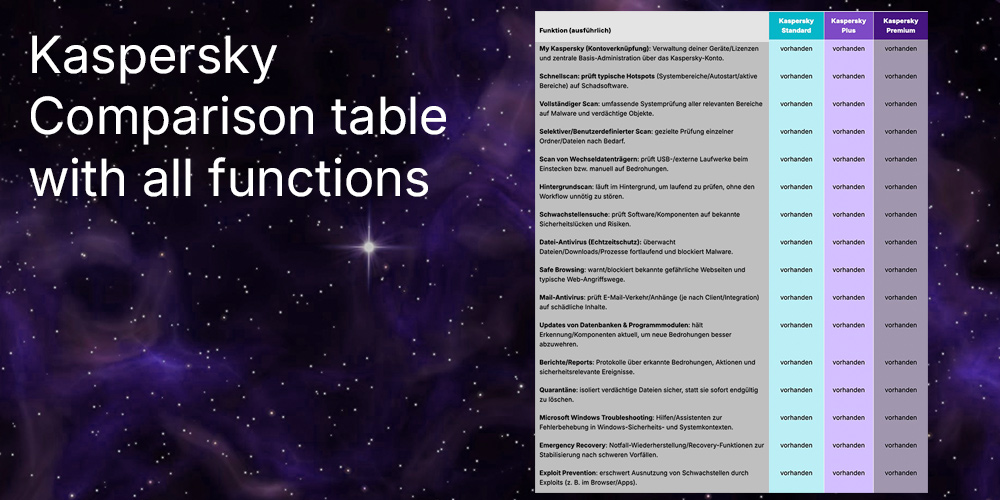
Premium includes everything in Plus and adds Identity Protection, Smart Home monitoring, 24/7 remote IT support, and a free year of Safe Kids parental controls. The biggest practical gap between the tiers is the VPN and password manager: both are reserved for Plus and Premium, while Standard ships only the core antivirus, firewall, and payment protection. If you mainly want family controls and identity monitoring in one package, Premium is the only tier that bundles them. The table below shows the verified feature differences across the three editions.
| Feature | Standard | Plus | Premium |
|---|---|---|---|
| Real-time antivirus | ✓ | ✓ | ✓ |
| Firewall | ✓ | ✓ | ✓ |
| Unlimited VPN | ✕ | ✓ | ✓ |
| Password Manager | ✕ | ✓ | ✓ |
| Identity Protection | ✕ | ✕ | Limited |
| Parental controls | ✕ | ✕ | ✓ |
| 24/7 remote IT support | ✕ | ✕ | ✓ |
Yes, Kaspersky Premium includes the Kaspersky VPN Secure Connection with unlimited data and no daily traffic cap. It offers servers in over 70 countries, a kill switch, and split-tunneling, though split-tunneling is limited to Windows 10 and later. For daily use this means you can keep the VPN running on public Wi-Fi, in a hotel, or while streaming without hitting the data ceiling that the free VPN tier enforces. One regional note: the VPN cannot be downloaded or activated in some countries such as Belarus, so check local availability before relying on it.
Yes, one Kaspersky Premium subscription covers Windows, macOS, Android, iOS, and Linux from a single My Kaspersky account. Feature parity is not identical across platforms: the full firewall and Safe Money secure browser are strongest on Windows, while iOS focuses on VPN, web protection, and identity tools because of Apple's system restrictions. This matters if you plan to protect a mixed household, since the mobile apps handle phishing links and Wi-Fi checks rather than deep system scanning. You manage every device, license, and renewal centrally through the My Kaspersky web portal.
The main item to verify is Identity Protection, which is provided through Iris Powered by Generali and is not available in every country. Its breach monitoring also focuses on email addresses and phone numbers rather than the broader credit-card and document monitoring some competitors offer in certain regions. Before buying, confirm both the VPN and Identity Protection are offered where you live, since these are the features that separate Premium from the cheaper Plus tier. If identity monitoring is unavailable in your region, Kaspersky Plus may deliver nearly the same day-to-day protection for less.
Yes, Premium bundles the full version of Kaspersky Safe Kids, which is not part of Standard or Plus. It adds web and app filtering, screen-time limits, and a real-time GPS location map for children, working across Windows, macOS, Android, and iOS.
Kaspersky relocated its data processing and core software assembly for many regions to Switzerland and runs Transparency Centers where code can be reviewed. Independent labs such as AV-TEST and AV-Comparatives continue to certify its detection engine, and Kaspersky reported winning 93 first-place awards across 100 independent tests in the past year.
Kaspersky's suite is consistently rated among the lighter premium products in independent performance tests, and it includes a gaming mode that suspends notifications and scheduled scans during full-screen use. It also adds performance tools like a hard-drive health monitor and duplicate-file remover to keep older hardware responsive.
| Operating Systems | Windows 11: Home / Pro / Enterprise Windows 10: Home / Pro / Enterprise Windows 8.1: Pro / Enterprise Windows 8: Pro / Enterprise Windows 7: Starter / Home Basic / Home Premium / Professional / Ultimate – SP1 or higher |
| Processor | 1 GHz or higher, x86 or x64 that supports the SSE2 instruction set. ARM architecture is not supported. |
| Memory RAM | Windows 11: 4 GB for 64-bit. Windows 10, Windows 8.1, Windows 8, Windows 7: 1 GB for 32-bit or 2 GB for 64-bit. |
| Hard Disk | 500 MB free disk space. |
| Display |
Minimum screen resolution: 1024 x 768. |
| Protection Modules | Real-time File Anti-Virus. Network Attack Blocker. Safe Browsing. Mail Anti-Virus. Firewall. System Watcher rollback protection for ransomware and other threats. Anti-Phishing. |
| Note | Requires Microsoft Windows Installer 4.5 or later and Microsoft .NET Framework 4 or later. Windows 7 requires Service Pack 1. |
| Operating Systems |
macOS Tahoe 26 |
| Processor | Intel or Apple silicon. |
| Memory RAM | 8 GB. |
| Hard Disk | 4475 MB of free disk space. |
| Display | Standard display compatible with the respective operating system. |
| Protection Modules | Real-time File Anti-Virus. Web Anti-Virus for HTTP and HTTPS in supported browsers. Network Attack Blocker. Safe Money website validation. Privacy Protection including webcam access blocking features. Home Network monitoring. |
| Note | Internet connection required. |
| Operating Systems | Android 11 or later |
| Processor | Intel Atom x86 or ARMv7 and higher. |
| Memory RAM | Requirements met by any device running the supported OS version. |
| Hard Disk | 270 MB of free space. |
| Display | Standard display compatible with the respective operating system. |
| Protection Modules | Automatic Anti-Virus real-time protection. Scanner on-demand scans. Safe Browsing. Safe Messaging. App Lock. Where Is My Device. Call Filter. Weak Settings Scan. Data Leak Checker. Smart Home Monitor. |
| Note | App must be installed only to the device main memory. Supported operating systems may depend on your region. |
| Operating Systems | iOS 26.x or later |
| Memory RAM | Requirements met by any device running the supported OS version. |
| Hard Disk | 150 MB of free disk space. |
| Display | Standard display compatible with the respective operating system. |
| Protection Modules | Phishing and web threat protection via Web Protection. |
| Note | Internet connection required. Kaspersky app includes Kaspersky VPN Secure Connection functionality and requires uninstalling one of the apps to use the other. |


