What are the main features and advantages of Microsoft Server 2022 User CAL?
User Access – One person can access Windows Server services.
Multi Device – Same user connects from multiple devices easily.
Simple Compliance – Track users once across all server roles.
Core Services – Use file, print, and directory resources.
Flexible Scaling – Add new users without changing devices.
Cost Planning – Best when staff use several endpoints.
Access right – Grants one named user access to Windows Server 2022.
Per-user model – Covers that user across unlimited devices and endpoints.
Core services – Authorizes file, print, DHCP, DNS, AD access.
Backward compatible – Also covers Server 2019, 2016 and earlier.
Add-on license – Supplements the base CALs in Server Standard.
Important – This is not a server license or RDS CAL.
A Windows Server 2022 User CAL is the access license one employee needs to legally use the services of a Windows Server 2022 machine. It licenses the person rather than the hardware, so a single CAL follows that user across their laptop, desktop, and phone.
One per person – One CAL covers all of a user's devices.
Compliance proof – Documents lawful server access for audits.
No expiry – Perpetual right tied to the server version.
Reassignable – Move a CAL to a replacement staff member.
Mixed servers – One CAL reaches older 2019 and 2016 servers.
Scales cleanly – Buy exactly the number of users you have.
A User CAL grants one named person the legal right to access the services of a Windows Server 2022 installation, such as file shares, print queues, Active Directory, DHCP and DNS. It is a paper access license, not the server operating system itself, and it does not install or activate. The server software still has to be licensed separately per core, with a 16-core minimum per server. Without a matching CAL for each connecting user, the deployment is out of compliance once the 120-day grace period ends.
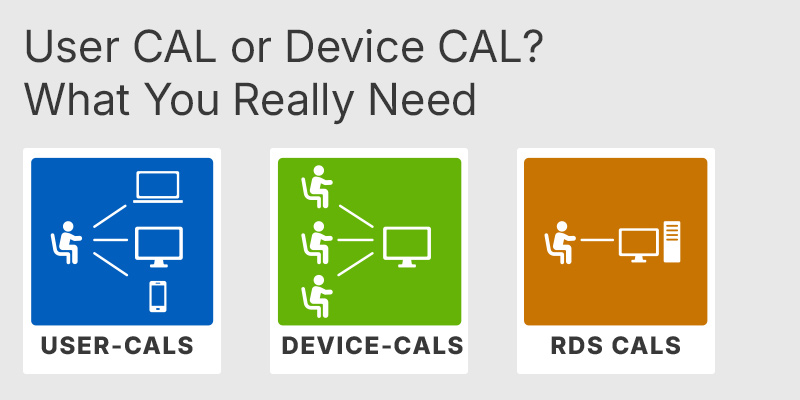
A User CAL licenses one person to connect from any number of devices, while a Device CAL licenses one device that any number of people may share. The choice is purely a counting exercise: if staff use several devices each (laptop, desktop, phone), User CALs are cheaper; if many workers share a few machines on shifts, Device CALs win. A kiosk used by five people needs one Device CAL, not five User CALs. Microsoft permits mixing both types, but a single model is far easier to track during an audit.
| Aspect | User CAL | Device CAL |
|---|---|---|
| Licenses | A person | A device |
| Multiple devices per user | ✓ | ✕ |
| Shared device, many users | ✕ | ✓ |
| Best for | Mobile staff | Shift workers |
| Backward compatible | ✓ | ✓ |
No. A standard User CAL only authorizes access to core server services; it does not cover Remote Desktop session use. Windows Server 2022 allows just two simultaneous Remote Desktop connections for administration by default. Any user running applications or a desktop over RDS needs a separate RDS User CAL layered on top of the base CAL, and the two are not interchangeable. This is the single most common licensing mistake buyers make, so confirm whether your users connect locally or via Remote Desktop before ordering.
Yes, once you exceed the bundled allowance. Windows Server 2022 Standard ships with a small number of base CALs included with the per-core server license, so additional User CALs are an add-on you buy to cover every further user. The CAL itself does not install or activate; it is a license record assigned to a user in Active Directory and tracked for audit purposes. Microsoft does not technically block extra connections, which is why under-buying CALs stays invisible until a Software Asset Management audit surfaces the shortfall.
Confirm three things: the CAL version, the access type, and your user-to-device ratio. A CAL must match or exceed the server version, so a 2022 User CAL covers Server 2022 and earlier but will not authorize a Server 2025 machine. Decide whether plain network access is enough or whether Remote Desktop is involved, since the latter needs an additional RDS CAL. Finally, count how many of your people use multiple devices, because that ratio decides whether User or Device CALs cost less.
| Important | To use Microsoft Windows Server 2022 User CAL, your server must meet the Windows Server host requirements and RDS licensing compatibility hardware and software specifications. |
| Compatibility | Windows Server 2022: Standard / Datacenter. Earlier Windows Server versions through downgrade rights. |
| Operating Systems | Windows Server 2022: Standard / Datacenter |
| Processor | 1.4 GHz or faster 64-bit processor. x64 instruction set compatibility is required. NX, DEP, CMPXCHG16b, LAHF, SAHF, PrefetchW, and Second Level Address Translation support are required. |
| Memory RAM | 1 GB minimum for Server Core. 2 GB minimum for Server with Desktop Experience. ECC memory or similar technology is required for physical host deployments. |
| Hard Disk | 32 GB minimum system partition space. Additional space may be required for paging, updates, server roles, and applications. |
| Note | The User CAL does not include Windows Server installation software. A separate Windows Server 2022 Standard or Datacenter server license is required. One User CAL permits one licensed user to access licensed Windows Server services from any device. A Windows Server 2022 CAL permits access to Windows Server 2022 and earlier versions, but not later versions. A separate RDS User CAL is required to access Remote Desktop Services. CALs are required for users accessing Windows Server directly or indirectly. Multiplexing or connection pooling does not reduce the number of required CALs. An Ethernet adapter providing at least 1 gigabit per second and compatible with PCI Express is required for the host server. |
keys.express and keys.discount are online platforms for product keys. The product keys available in our shops for Windows and other software are inexpensive, secure, legal and come with an activation guarantee.
Below you will find the most important legal information about our products.
We offer exclusively unused and non-activated product keys. The keys have never been redeemed for activation and are fully available to the purchaser for the first-time activation of the respective product. A key that has already been redeemed could no longer be used for a new activation and is therefore not offered by us.
Trading in these product keys is permissible in the European Union and in Switzerland under current case law, provided that the necessary conditions are met. These conditions are as follows:
This trade is legally permissible because the underlying license was already placed on the market with the consent of the rightholder within the EU/EEA or Switzerland in return for appropriate remuneration. As a result, the so-called principle of exhaustion has taken effect, which permits the resale of individual product keys — in particular those originating from volume license agreements. Microsoft or the respective software provider has already received appropriate remuneration for this.
keys.express and keys.discount ensure that the aforementioned conditions are met and that the lawful use of the software is guaranteed. The requirements arising from European legislation are also observed in Switzerland.
Important note: The acquisition of a product key through the transmission of a combination of numbers and letters in digital form does not, in itself, constitute a license for the lawful use of the program. The license only arises from the respective installation and the associated acceptance of the manufacturer's terms of use.
Further information can be found here: