What are the key benefits and advantages of Microsoft Server 2022 RDS User CAL?
User Rights – License one person for RDS sessions on servers.
Multi Device – Same user connects from any approved device.
Remote Work – Enable secure desktops and apps for staff.
Central Control – Host sessions centrally to simplify administration.
Scalable Access – Add users as remote usage grows.
Cost Clarity – Pay per user instead of per machine.
RDS User CAL – Licenses one named user for Remote Desktop sessions.
Device Freedom – That user may connect from any number of devices.
Active Directory – CAL is assigned and tracked per AD user account.
Backward Compatible – Also covers 2019 and 2016 session hosts.
Core Capacity – Licenses remote-session access only, not the server itself.
Important – Windows Server license and base Server CAL are not included.
A Remote Desktop Services User CAL grants one named person the right to run Remote Desktop sessions on a Windows Server 2022 session host. It is an access license that sits on top of the server license and the standard Windows Server CAL, not a standalone product.
Per-User Model – Follows the person across desktop, laptop, and phone.
Remote App Access – Run centrally hosted desktops and applications remotely.
Roaming Workers – Ideal when staff switch between several devices.
License Tracking – Issued and reported via RD Licensing Manager.
Downgrade Rights – Usable against 2019 and 2016 RDS hosts.
Perpetual Right – Covers the supported life of the 2022 RDS version.
It legally entitles one user to open Remote Desktop Services sessions on a Windows Server 2022 host beyond the two free administrative sessions. Once the RD Session Host role is active, every connecting user must hold an RDS CAL, which the Remote Desktop Licensing server issues and tracks. A User CAL is tied to a person in Active Directory, so that individual can connect from a work PC, home laptop, or tablet without needing a separate license for each device. This is the right choice when your headcount is lower than your device count, or when staff move between machines.
No. The RDS User CAL is an add-on license only and includes neither the Windows Server 2022 operating system nor the base Windows Server CAL. Microsoft requires three separate things for licensed remote access: the server license, a standard Windows Server CAL for general server access such as file and print, and the RDS CAL for the remote-session right itself. Buyers frequently assume one purchase covers everything, then hit a licensing wall after deployment. Confirm you already own, or are buying alongside, the server license and standard CALs before relying on this product.
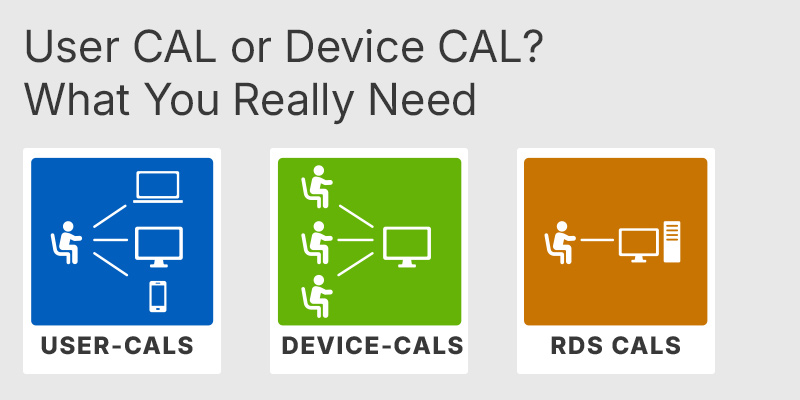
A User CAL licenses one person to connect from unlimited devices, while a Device CAL licenses one shared device used by unlimited people. Pick User CALs when you have more devices than users, such as employees with a desktop, laptop, and phone each. Pick Device CALs for shift-based setups where several workers share the same terminal across the day. One concrete operational difference: up to 20% of Device CALs can be revoked and reassigned, but Per User RDS CALs cannot be revoked at all. Mixing both types in one environment is allowed but makes auditing harder, so most organisations standardise on one.
| Feature | RDS User CAL | RDS Device CAL |
|---|---|---|
| Assigned to | User account | Device |
| Connect from any device | ✓ | ✕ |
| Shared by many users | ✕ | ✓ |
| Tracked in a workgroup | ✕ | ✓ |
| Revocable / reassignable | ✕ | Up to 20% |
| Best fit | Roaming users | Shared shifts |
A Windows Server 2022 RDS CAL is backward-compatible: it works with session hosts running Server 2022, 2019, and 2016, but it cannot license a Server 2025 host. RDS CALs only work downward, never upward, so a newer server always needs a newer or matching CAL. The same rule applies to the licensing server itself, which must run a version equal to or newer than the CALs being installed on it. Before buying, check the exact Windows Server version your session host runs so the CAL version lines up.
Yes. RDS User CALs are installed, issued, and tracked through the RD Licensing role, which is a separate role you add to a Windows Server. There is a 120-day grace period during which Remote Desktop works without a license server, after which clients are refused with a licensing error until valid CALs are issued. Per User CALs also require Active Directory, because the license server cannot track them in a workgroup environment. Plan to stand up the RD Licensing role and join the host to your domain before the grace period expires.
Confirm four things: that you already hold the Windows Server license and base Server CALs, that your environment uses Active Directory rather than a workgroup, that your session host runs Server 2022 or earlier, and that you have more devices than users. The User model only pays off when people connect from several devices each; in shift-based setups where workers share machines, Device CALs are cheaper. Because Per User CALs cannot be revoked, over-buying is hard to unwind, so size the count to your actual named users.
Two. Windows Server allows two simultaneous administrative Remote Desktop sessions for management purposes without any RDS CAL. The moment you install the RD Session Host role for general user access, or need a third concurrent session, RDS CALs become mandatory.
No. RDS CALs are backward-compatible only, so a 2022 CAL covers 2022, 2019, and 2016 session hosts but not 2025. Accessing a 2025 host requires a Windows Server 2025 RDS CAL.
Yes. Any person connecting to your Remote Desktop environment needs an RDS CAL, with no exemption for external users. For large numbers of external users, Microsoft offers an RDS External Connector as an alternative to individual CALs.
| Important | To use Microsoft Server 2022 RDS User CAL, your server must meet the Windows Server host requirements and RDS licensing compatibility hardware and software specifications. |
| Compatibility | Windows Server 2022 Windows Server 2019 Windows Server 2016 |
| Operating Systems | Windows Server 2022: Standard / Datacenter |
| Processor | 1.4 GHz 64-bit processor or faster. Compatible with the x64 instruction set. Support for NX and DEP. Support for CMPXCHG16b, LAHF/SAHF, and PrefetchW instructions. Support for Second Level Address Translation through EPT or NPT. |
| Memory RAM | 512 MB for Server Core. 2 GB for Server with Desktop Experience. ECC memory or similar technology for physical host deployments. |
| Hard Disk | At least 32 GB of available system partition space. Additional space may be required for network installation, paging, hibernation, and dump files. |
| Display | Monitor capable of a resolution of 1024 × 768 or higher. |
| Graphics | Super VGA compatible graphics device. |
| Note | The RDS User CAL must be installed on a Remote Desktop Licensing server running Windows Server 2022 or newer. A base Windows Server CAL is required in addition to the RDS User CAL. Each RDS User CAL licenses one user to access Remote Desktop Services from any number of devices. RDS User CALs require a domain-joined environment and are not permitted for workgroup deployments. Actual requirements depend on the installed server roles, applications, features, and system configuration. |
keys.express and keys.discount are online platforms for product keys. The product keys available in our shops for Windows and other software are inexpensive, secure, legal and come with an activation guarantee.
Below you will find the most important legal information about our products.
We offer exclusively unused and non-activated product keys. The keys have never been redeemed for activation and are fully available to the purchaser for the first-time activation of the respective product. A key that has already been redeemed could no longer be used for a new activation and is therefore not offered by us.
Trading in these product keys is permissible in the European Union and in Switzerland under current case law, provided that the necessary conditions are met. These conditions are as follows:
This trade is legally permissible because the underlying license was already placed on the market with the consent of the rightholder within the EU/EEA or Switzerland in return for appropriate remuneration. As a result, the so-called principle of exhaustion has taken effect, which permits the resale of individual product keys — in particular those originating from volume license agreements. Microsoft or the respective software provider has already received appropriate remuneration for this.
keys.express and keys.discount ensure that the aforementioned conditions are met and that the lawful use of the software is guaranteed. The requirements arising from European legislation are also observed in Switzerland.
Important note: The acquisition of a product key through the transmission of a combination of numbers and letters in digital form does not, in itself, constitute a license for the lawful use of the program. The license only arises from the respective installation and the associated acceptance of the manufacturer's terms of use.
Further information can be found here: