↑
Back to Top
What are the key benefits and advantages of Microsoft Server 2019 RDS User CAL?
User Rights – License one person for RDS sessions access.
Multi Device – Same user connects from any approved device.
Remote Work – Deliver desktops and apps to remote staff.
Central Hosting – Run sessions on servers for easier management.
Scalable Access – Add users as remote demand increases.
Cost Clarity – License per user, not per workstation.
RDS Access Right – Lets a named user open Remote Desktop sessions.
Per User Model – One license follows the user across any device.
Active Directory Assignment – CAL is tracked per user in Active Directory.
Application Delivery – Covers full desktops and individual published apps.
Backward Host Support – Works on Server 2019 and Server 2016 hosts.
Important – No Windows Server license or Windows Server CAL is included.
Core Capacity – A 2019 RDS CAL cannot license 2022 or 2025 hosts.
The RDS User CAL is the access license each user needs to connect to a Remote Desktop Session Host running on Windows Server 2019. It sits on top of the base server license and the standard Windows Server CAL, and it keeps multi-user remote sessions compliant once the grace period ends.
Device Freedom – User connects from laptop, desktop, or thin client.
Compliance Coverage – Keeps RDP sessions legal past the 120-day grace.
No Revocation Loss – Per user CALs are never revoked or reclaimed.
Cross-Domain Issuing – License server issues CALs across domains and forests.
Roaming Workforce – One CAL fits staff who switch machines often.
Type Conversion – Can be converted to Device CALs if needs change.
It grants one user the right to start a Remote Desktop session on a Windows Server 2019 Session Host. Without an RDS CAL, Windows Server only allows two simultaneous administrative RDP connections for maintenance, and any further remote sessions stop working once the 120-day grace period ends. The CAL is requested from a Remote Desktop Licensing server each time the user signs in and is then tied to that user in Active Directory. This is what turns a single server into a working multi-user remote application or desktop environment.
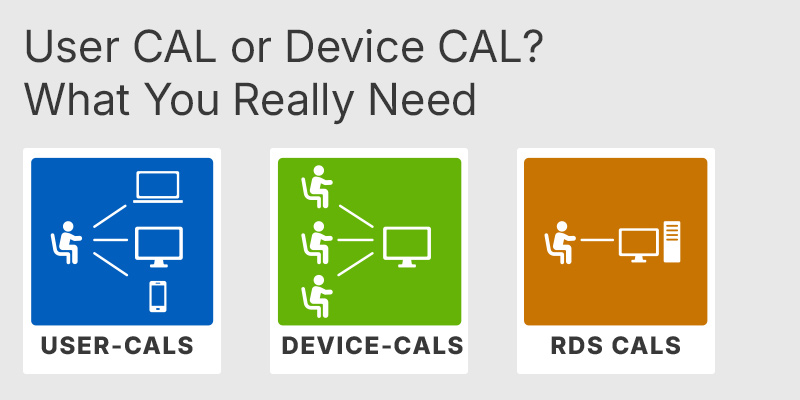
A User CAL is assigned to a person and lets that person connect from any number of devices, while a Device CAL is assigned to a machine and lets any number of people use that one device. The per user model suits cases where each employee has their own equipment or works from several devices, such as an office PC plus a home laptop. The per device model fits shift work where multiple staff share the same physical workstations. One practical difference: up to 20% of per device CALs can be revoked through the licensing manager, but per user CALs cannot be revoked at all, so size the user count carefully before buying.
Yes. The RDS User CAL is an additional license and does not replace either the base Windows Server 2019 license or the standard Windows Server CAL. The Windows Server CAL covers basic access to server services such as file, print, and DNS, while the RDS CAL specifically covers the Remote Desktop session itself. In practice a remote user needs both: a Windows Server CAL to reach the server and an RDS CAL to run the desktop or app remotely. Buying RDS CALs alone, expecting them to enable a server on their own, is the most common purchasing mistake with this product.
No. A Windows Server 2019 RDS CAL can only license session hosts running Windows Server 2019 or Windows Server 2016, not 2022 or 2025. RDS CAL compatibility runs backward only: newer CALs cover older hosts, but older CALs never cover newer hosts. So if you plan to move your Session Host to Server 2022 within the license lifetime, a 2019 CAL will not follow it and you would need to buy 2022 CALs. Confirm the exact Windows Server version of your RD Session Host before ordering, because the CAL version must match or exceed it.
Confirm three things: the Windows Server version of your Session Host, whether your environment fits the per user model, and that you have a Remote Desktop Licensing server to install the CALs on. The license server must run Windows Server 2019 or later to host 2019 RDS CALs. Per user CALs also cannot be validated in a pure workgroup, so they assume an Active Directory domain for proper assignment. If your users share fixed workstations on shifts rather than carrying their own devices, a Device CAL is usually the more economical choice.
No. Per user RDS CALs are assigned to user accounts in Active Directory and cannot be validated in a workgroup, which is why workgroup sessions get dropped. If you run without a domain, the per device CAL is the type that still works, since it is tied to hardware rather than to a directory account.
Yes. Installed RDS CALs can be converted between per user and per device using the Convert Licenses option in the RD Licensing Manager console or the Convert-License PowerShell cmdlet. After converting, the Session Host licensing mode must be set to match the new CAL type, or the converted CALs will not be issued.
Yes. Every user who connects to the Remote Desktop environment needs an RDS CAL, with no exemption for external contractors, partners, or clients. For a large number of outside users, Microsoft offers an External Connector license as an alternative to buying individual CALs for each one.
Windows Server 2019 gives a 120-day grace period during which the Session Host role works without a license server. Once it ends, clients without a valid RDS CAL can no longer sign in and see an error stating that no Remote Desktop License Servers are available. Installing your RDS User CALs on an activated license server before that point prevents the lockout.
| Processor | 1.4 GHz 64-bit processor. Compatible with x64 instruction set. Supports NX and DEP. Supports CMPXCHG16b, LAHF SAHF, and PrefetchW. Supports Second Level Address Translation EPT or NPT. |
| Memory RAM | 512 MB for Server Core. 2 GB for Server with Desktop Experience. ECC Error Correcting Code type or similar technology recommended for physical host deployments. |
| Hard Disk | 32 GB minimum disk space for the system partition. |
| Display | Monitor capable of Super VGA 1024 x 768 or higher resolution. |
| Graphics | Graphics device capable of Super VGA 1024 x 768 or higher resolution. |
| Note | Each user or device that connects to a Remote Desktop Services session host needs an RDS CAL. You cannot use older RDS CAL versions to access newer Windows Server versions, but you can use newer RDS CAL versions to access earlier Windows Server versions. To install Windows Server 2019 RDS CALs, use a Remote Desktop Licensing server running Windows Server 2019 or later. Per user RDS CAL licensing is not enforced, and compliance is the administrator responsibility. |
keys.express and keys.discount is a web platforms for new and used product keys. The product keys for Windows and other software available in the shop of keys.express and keys.discount are cheap, safe, legal and with activation guarantee.
Here you can find some general information about used software, an overview of the most important legal information as well as answers to frequently asked questions from our customers ("FAQ“)
Used software is available for sale in the European Union as well as in Switzerland according to current jurisdiction provided that the necessary conditions are met. The necessary conditions are as follows:
keys.express and keys.discount ensure that the above mentioned requirements are met and that a legal use of the software is guaranteed. The requirements of the European legislation are also met in Switzerland.
You can find further information on:
There is a lot of legal information about the topic of used software. We are more than happy to answer any questions you may have. You can contact us at any time via welcome(at)keys.express. In the meantime, you can also find a short overview of the most important legal information regarding used software here:
For distance contracts concluded by telephone, on the Internet or when ordering from a catalogue, EU law provides for the possibility for consumers to withdraw from the contract for a certain period of time ("right of withdrawal"). A consumer in this sense is any natural person who concludes a legal transaction for purposes that are predominantly neither commercial nor self-employed. In Switzerland we usually speak of consumers.
Consumers have the right to cancel the contract within fourteen calendar days without giving reasons. The revocation period begins on the day the contract is concluded.
In order to exercise your right of withdrawal from keys.express or keys.discount, you must inform us by means of a clear statement (e.g. a letter, fax or e-mail sent by post) of your decision to withdraw from this contract. For this purpose, you can contact us using the following information:
Keys Distribution Ltd
Suite 2, 215 Main Street
Gibraltar Heights, Gibraltar
Phone +423 7989130
Email: welcome@keys.discount
keys.express and keys.discount also provides a template revocation form. In order to comply with the revocation period, it is sufficient to send the notification of the exercise of the right of revocation to Keys Distribution Ltd before the end of the revocation period.
If you revoke this contract, we must reimburse you for all payments which we have received from you for the corresponding order, including delivery costs (with the exception of additional costs which result from the fact that you have chosen a different type of delivery than the cheapest standard delivery offered by us), immediately and at the latest within fourteen calendar days from the day on which we receive notification of your revocation of this contract. For this repayment we will usually use the same means of payment that you used for the original transaction, unless expressly agreed otherwise with you. In no case will you be charged for this refund.