


Back to Top
Visual Studio 2026 Professional oder Enterprise: Alle Funktionen und Unterschiede als Tabelle
February 13, 2026
Views:
126

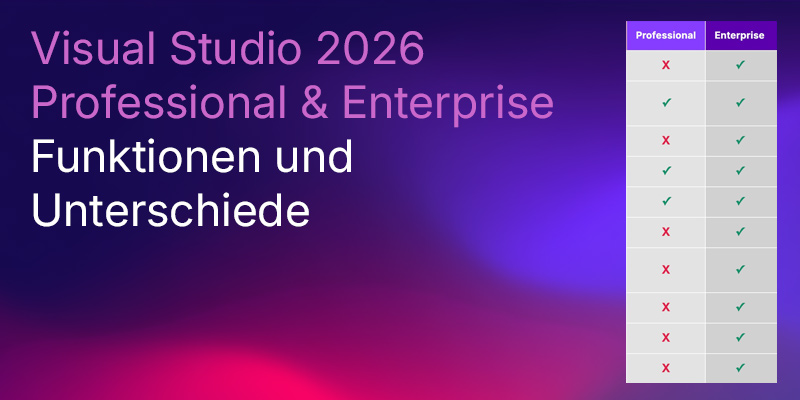
| Visual Studio 2026 Funktionen | Professional | Enterprise |
|---|---|---|
| Code Maps erstellen & voll bearbeiten | X | ✓ |
| Code Maps öffnen (read-only) / filtern / generische Nodes / neuen Directed Graph aus Auswahl erzeugen | ✓ | ✓ |
| Dependency Diagrams (Layer Diagrams) erstellen | X | ✓ |
| Dependency Diagrams (Layer Diagrams) lesen (read-only) | ✓ | ✓ |
| Live Dependency Validation (Echtzeit-Architektur-Checks gegen Dependency Diagram) | X | ✓ |
| Code Clone Analysis (Duplikate/ähnlichen Code finden) | X | ✓ |
| IntelliTrace (historisches Debugging) | X | ✓ |
| Snapshot Debugger (Snappoints/Logpoints für Live-/Prod-Szenarien) | X | ✓ |
| Time Travel Debugging (TTD, in Snapshot-Debugger-Szenarien) | X | ✓ |
| Live Unit Testing | X | ✓ |
| Microsoft Fakes (Unit Test Isolation) | X | ✓ |
| IntelliTest (deprecated in VS 2026) | X | ✓ |
| Code Coverage (integriert) | ✓ | ✓ |
| Unit Testing (Test Explorer, Debug Tests, Adapter-Integration) | ✓ | ✓ |
| Directed Graphs (DGML) erstellen/bearbeiten | ✓ | ✓ |
Disclaimer
This article is for general information purposes only and does not constitute a sales or licensing recommendation. All information has been compiled to the best of our knowledge, but is provided without guarantee of completeness or accuracy. License conditions are subject to change and may be interpreted differently in individual cases. The content does not replace individual legal or licensing advice.
February 13, 2026
Beliebte Beiträge