
Hello!
Thank you for your purchase! To ensure successful installation and activation, please proceed as follows:
Visit the following website:
https://redeem.licenses.adobe.com/getserial
Sign in with your existing Adobe account. If you do not have an account yet, please create a new one.
Carefully note down your email address and password for future logins.
Register the serial number:
Enter your serial number (without spaces) in the designated field.
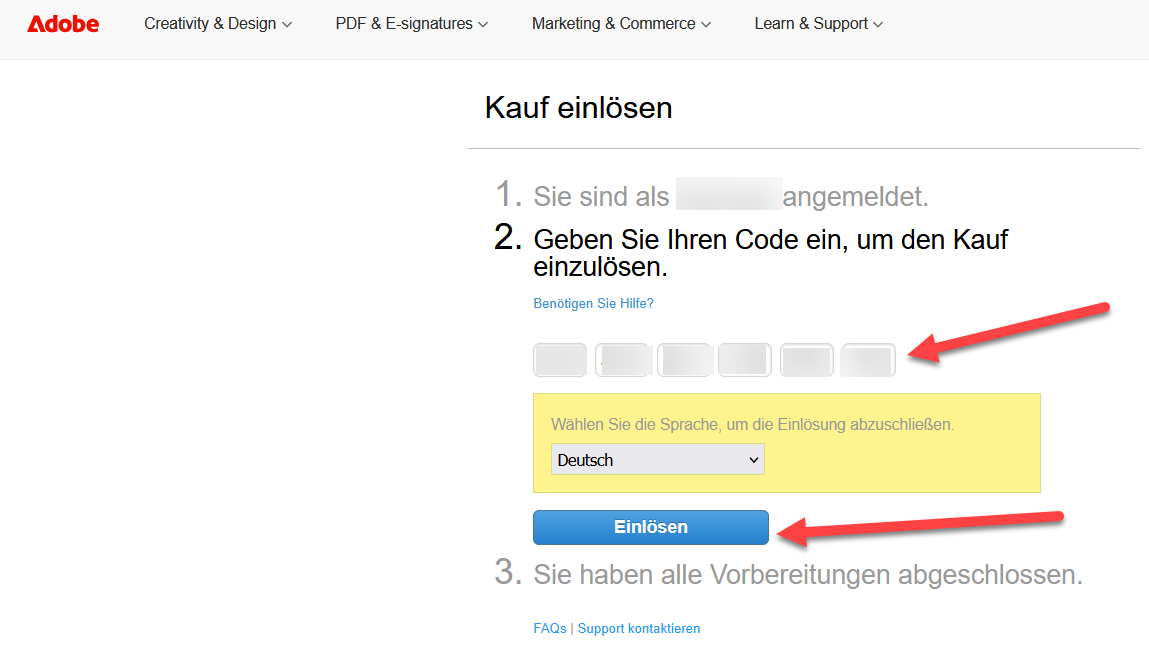
Confirm by clicking “Register.”
It is recommended to keep the serial number for future reference.
Download the product:
After successful registration, your product will appear under “Registered Products.”
Click “Download” and save the installation file to your preferred location.
Start installation:
Open the downloaded file and follow the on-screen installation instructions.
Once the installation is complete, your Adobe version is ready for use.
Change the language:
Open Adobe Acrobat 2020.
Go to “Edit” > “Preferences” > “Language.”
Select the desired language from the dropdown menu.
Click “OK” or “Apply” to confirm the change.
If there are any further problems with the installation or activation, please write to us. Simply use our contact form and send a screenshot of the error message at the same time. We are happy to help you.
SKU: 7020, 7019


