

Back to Top
Quels sont les principaux avantages et bénéfices de Windows Server 2022 Device CAL ?
Licence par appareil – Licence pour un appareil pour les services Windows Server.
Postes de travail partagés – Un PC sous licence prend en charge plusieurs utilisateurs qui se relaient.
Conformité simplifiée – Suivez les appareils plutôt que les utilisateurs pour faciliter les audits.
Rentabilité – Réduisez les coûts dans les environnements à rotation et à partage d'appareils.
Accès au serveur – Couvre les connexions aux services de fichiers, d'impression et d'annuaire.
Prêt pour l'audit – Le nombre clair d'appareils simplifie la planification et les contrôles de conformité.
 Bestseller in this category
Accès par appareil – Octroie une licence par appareil pour tout utilisateur se connectant.
Services serveur de base – Couvre le partage de fichiers, l'impression et Active Directory.
Couverture par appareil partagé – Nombre illimité d'utilisateurs par appareil physique sous licence.
Rétrocompatibilité – Fonctionne avec les serveurs 2016, 2019 et 2022.
Comptage par appareil – Une licence d'accès client (CAL) par terminal, et non par personne.
Important – L'accès au Bureau à distance (RDS) et la licence du système d'exploitation du serveur ne sont pas inclus.
Capacité de base – Accorde uniquement un accès standard au serveur, jamais de sessions Bureau à distance.
Une licence d'accès client (CAL) par appareil est la licence qui autorise légalement un appareil à utiliser les services de Windows Server 2022, tels que l'accès aux fichiers, à l'impression et aux répertoires. Elle s'achète en plus de la licence serveur et est comptabilisée par appareil plutôt que par utilisateur.
Coût par poste réduit – Plus économique lorsque de nombreuses personnes partagent un petit nombre de machines.
Licences adaptées aux rotations – Une seule licence couvre la rotation des appareils 24 heures sur 24.
Comptage simple des appareils – Adaptez les licences aux terminaux physiques, et non au nombre d'utilisateurs.
Utilisation de versions mixtes – Les mêmes licences d'accès client (CAL) couvrent les anciens serveurs 2016 et 2019.
Conformité prévisible – Le nombre fixe de terminaux simplifie la préparation des audits.
Droits perpétuels – Reste valable pour la version Server 2022 qu'elle couvre.
Une licence d'accès client (CAL) par appareil accorde à un appareil spécifique le droit d'accéder aux services Windows Server 2022, et tous les utilisateurs de cet appareil sont alors couverts. La licence serveur seule permet uniquement d'installer le système d'exploitation ; elle n'autorise pas légalement les clients à se connecter aux partages de fichiers, aux imprimantes ou à Active Directory. Microsoft exige une licence d'accès client (CAL) pour chaque appareil accédant à ces services dans les éditions Standard et Datacenter. C'est donc la licence d'accès client (CAL) par appareil qui transforme un serveur installé en un serveur que vos terminaux peuvent utiliser légalement. Elle n'accorde pas l'accès au Bureau à distance, qui nécessite une licence d'accès client (CAL) RDS distincte.
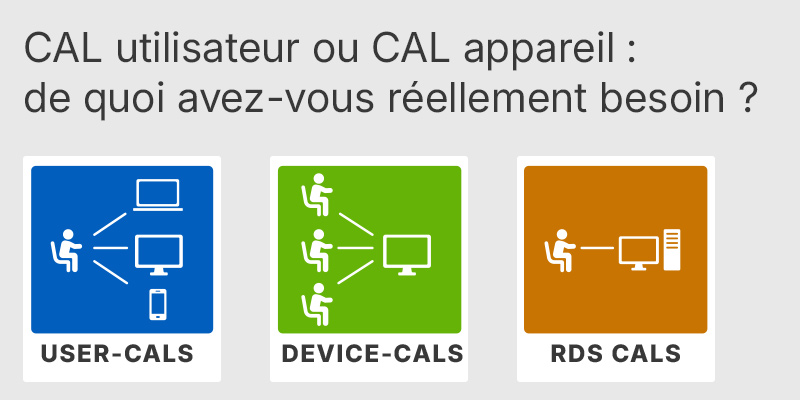
Licence d'accès client (CAL) par utilisateur ou par poste : ce dont vous avez réellement besoin
Explique dans quels cas une licence d'accès utilisateur (CAL) ou une licence d'accès par appareil (CAL) constitue le choix le plus rentable lors du passage à l'édition Standard.
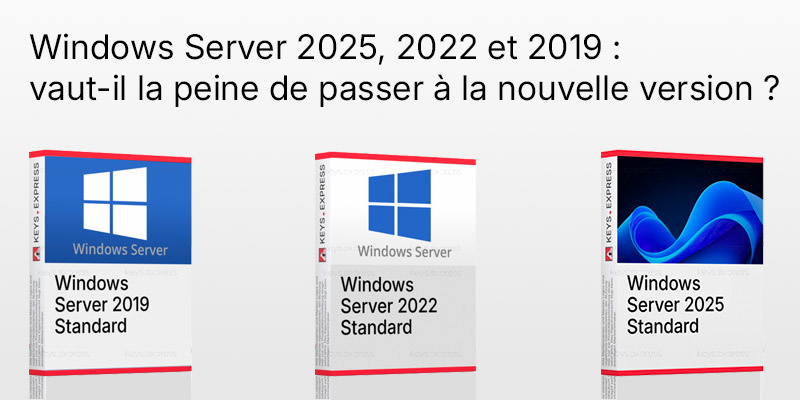
Fin du support de Windows Server 2022 : Windows Server 2025, 2022 et 2019 : vaut-il la peine de passer à la nouvelle version ?
Compare les versions de 2019, 2022 et 2025 afin de vous aider à déterminer s'il est intéressant de passer à la dernière version.
Une licence d'accès client (CAL) utilisateur autorise une personne à utiliser un nombre illimité de périphériques, tandis qu'une licence d'accès client (CAL) par périphérique autorise un périphérique à être utilisé par un nombre illimité d'utilisateurs. En pratique, il convient d'opter pour le nombre le plus faible dans votre environnement. Les licences d'accès client (CAL) par périphérique sont plus avantageuses lorsque plusieurs personnes partagent un ensemble fixe de machines, comme dans les centres d'appels, les usines, les postes de soins de santé ou les opérations fonctionnant 24 heures sur 24 et 7 jours sur 7. Cinq employés se relayant sur un même kiosque ont besoin d’une seule licence d’accès client (CAL) par poste, et non de cinq licences d’accès client (CAL) par utilisateur. Microsoft vous permet de combiner les deux types, mais le fait de s’en tenir à un seul modèle par population simplifie considérablement les audits et la planification des postes.
| Fonctionnalité | Licence d'accès client (CAL) par appareil | Licence d'accès client (CAL) utilisateur |
|---|---|---|
| Unité sous licence | Par appareil | Par utilisateur |
| Nombre illimité d'utilisateurs par appareil | ✓ | ✕ |
| Nombre illimité d'appareils par utilisateur | ✕ | ✓ |
| Idéal pour les appareils partagés/utilisés en rotation | ✓ | ✕ |
| Accorde l'accès au Bureau à distance (RDS) | ✕ | ✕ |
Non. Une licence d'accès client (CAL) par appareil standard pour Windows Server 2022 couvre les services de serveur de base tels que les fichiers, l'impression et Active Directory, mais elle n'autorise pas les sessions Bureau à distance. Tout accès régulier d'un utilisateur final via RDP nécessite une licence d'accès client (CAL) pour les services Bureau à distance (RDS) distincte, en plus de cette licence. Windows Server n'inclut que deux connexions administratives à distance, destinées à la maintenance du serveur et non au travail quotidien des utilisateurs. Si votre équipe se connecte à un hôte de session ou à une machine relais, prévoyez également des licences d'accès client RDS, sinon ces connexions ne seront pas conformes.
Oui. Les licences d'accès client (CAL) Windows Server sont rétrocompatibles ; une licence d'accès client (CAL) par appareil 2022 couvre donc également l'accès aux serveurs Windows Server 2019 et 2016. Elles ne sont pas compatibles en amont, ce qui signifie qu'une licence d'accès client (CAL) 2022 ne peut pas être utilisée pour accéder à un serveur Windows Server 2025. Cela est important dans les environnements mixtes : vous pouvez standardiser vos licences d'accès client (CAL) 2022 et rester en conformité avec les serveurs plus anciens sans acheter de licences distinctes pour chaque version. Veillez toujours à ce que la version de la licence d'accès client (CAL) corresponde à la version de serveur la plus récente que vos appareils utiliseront.
Vérifiez si votre environnement est centré sur les appareils ou sur les utilisateurs, car cela détermine quel type de licence CAL est le plus économique. Comptez le nombre de terminaux physiques accédant au serveur par rapport au nombre de personnes distinctes : si vous disposez de 30 postes de travail partagés utilisés par 100 employés en rotation, 30 licences CAL par appareil couvrent tout le monde. La licence d'accès client (CAL) est distincte de la licence de base de Windows Server, qui comprend elle-même un minimum de 16 cœurs par serveur. Vérifiez également que personne n'a besoin d'un accès Bureau à distance via ces appareils, car cela nécessite des licences d'accès client RDS supplémentaires qui ne sont pas couvertes ici.
Non. Une licence d'accès client (CAL) est une licence d'accès uniquement et n'inclut pas le logiciel serveur. Vous avez besoin d'une licence Windows Server 2022 distincte, vendue par cœur avec un minimum de 16 cœurs par serveur, ainsi que d'un nombre suffisant de licences d'accès client (CAL) pour couvrir les appareils qui se connectent.
Oui, Microsoft autorise les deux types dans le même environnement. Dans la pratique, il est plus simple d'attribuer des licences d'accès par poste (CAL) aux machines partagées par équipe et des licences d'accès par utilisateur (CAL) aux employés qui passent d'un appareil à l'autre, en conservant un modèle unique pour chaque groupe afin de faciliter la conformité.
Vous avez besoin d'une licence d'accès client (CAL) par périphérique physique qui accède au serveur, quel que soit le nombre de personnes qui l'utilisent. Trente postes de travail partagés nécessitent trente licences d'accès client (CAL), même si des centaines d'employés les utilisent à tour de rôle lors de différents quarts de travail.
| Important | Pour utiliser la licence d'accès client (CAL) par appareil Microsoft Windows Server 2022, votre serveur doit répondre aux exigences d'hébergement de Windows Server ainsi qu'aux spécifications matérielles et logicielles de compatibilité des licences RDS. |
| Compatibilité | Windows Server 2022: Standard / Datacenter. Versions antérieures de Windows Server via les droits de rétrogradation. |
| Systèmes d'exploitation | Windows Server 2022: Standard / Datacenter |
| Processeur | Processeur 64 bits cadencé à 1.4 GHz ou plus. La compatibilité avec le jeu d'instructions x64 est requise. La prise en charge des instructions NX, DEP, CMPXCHG16b, LAHF, SAHF, PrefetchW et de la traduction d'adresses de deuxième niveau est requise. |
| Mémoire RAM | 1 Go minimum pour Server Core. 2 Go minimum pour Server avec expérience de bureau. Une mémoire ECC ou une technologie similaire est requise pour les déploiements sur hôte physique. |
| Disque dur | 32 Go d'espace minimum sur la partition système. Un espace supplémentaire peut être nécessaire pour la pagination, les mises à jour, les rôles de serveur et les applications. |
| Affichage | Écran Super VGA avec une résolution de 1024 × 768 ou supérieure. |
| Remarque | La licence d'accès client (CAL) par périphérique n'inclut pas le logiciel d'installation de Windows Server. Une licence distincte pour Windows Server 2022 Standard ou Datacenter est requise. Une licence d'accès client (CAL) par périphérique autorise un périphérique sous licence, utilisé par un nombre illimité d'utilisateurs, à accéder aux services Windows Server sous licence. Une licence d'accès client (CAL) Windows Server 2022 permet d'accéder à Windows Server 2022 et aux versions antérieures, mais pas aux versions ultérieures. Une licence d'accès client (CAL) RDS distincte est requise pour accéder aux Services de bureau à distance. Des licences d'accès client (CAL) sont requises pour les périphériques accédant à Windows Server directement ou indirectement. Le multiplexage ou la mise en pool des connexions ne réduit pas le nombre de licences d'accès client (CAL) requises. Une carte réseau Ethernet offrant un débit d'au moins 1 gigabit par seconde et compatible avec PCI Express est requise pour le serveur hôte. |
keys.express et keys.discount sont des plateformes en ligne proposant des clés de produit. Les clés de produit disponibles dans nos boutiques pour Windows et d'autres logiciels sont avantageuses, sûres, légales et assorties d'une garantie d'activation.
Vous trouverez ci-dessous les principales informations juridiques relatives à nos produits.
Nous proposons exclusivement des clés de produit inutilisées et non activées. Ces clés n'ont jamais été utilisées à des fins d'activation et sont entièrement à la disposition de l'acquéreur pour la première activation du produit concerné. Une clé déjà utilisée ne pourrait plus servir à une nouvelle activation et n'est donc pas proposée par nos soins.
La commercialisation de ces clés de produit est licite dans l'Union européenne ainsi qu'en Suisse selon la jurisprudence actuelle, pour autant que les conditions requises soient remplies. Ces conditions sont les suivantes :
Cette commercialisation est juridiquement licite parce que la licence sous-jacente a déjà été mise en circulation avec le consentement du titulaire des droits au sein de l'UE/EEE ou en Suisse, en contrepartie d'une rémunération appropriée. De ce fait, le principe dit d'épuisement des droits s'applique, ce qui autorise la revente de clés de produit individuelles — en particulier celles issues de contrats de licences en volume. Microsoft ou le fournisseur de logiciels concerné a déjà perçu une rémunération appropriée à ce titre.
keys.express et keys.discount veillent à ce que les conditions susmentionnées soient remplies et à ce que l'utilisation licite du logiciel soit garantie. Les exigences découlant de la législation européenne sont également respectées en Suisse.
Remarque importante : l'acquisition d'une clé de produit par la transmission d'une combinaison de chiffres et de lettres sous forme numérique ne constitue pas, en elle-même, une licence permettant l'utilisation licite du programme. La licence ne naît que de l'installation concernée et de l'acceptation, qui en découle, des conditions d'utilisation du fabricant.
Vous trouverez de plus amples informations ici :






